
The Multidimensional Role of Clicks in Evaluation and Ranking
A click on a search result used to be a simple sign that someone found what they were looking for and was satisfied. Today, it’s far more complicated – Google employs advanced tracking systems, behavioral modeling, and internal evaluation metrics whose ultimate goal – however imperfect – is to measure user satisfaction. Clicks, too, have ceased to be a mere statistic and have become one of the more significant factors in SERP analytics.

In this article, I’m diving deep into the topic of clicks. I’ll show you how Google looks at our movements in the SERPs and what it draws from them. Thanks to insights from technical documentation, academic research, patents, materials disclosed in legal proceedings, and my own tests, I can today see what’s hiding „under the hood” of Google’s SERP evaluation.
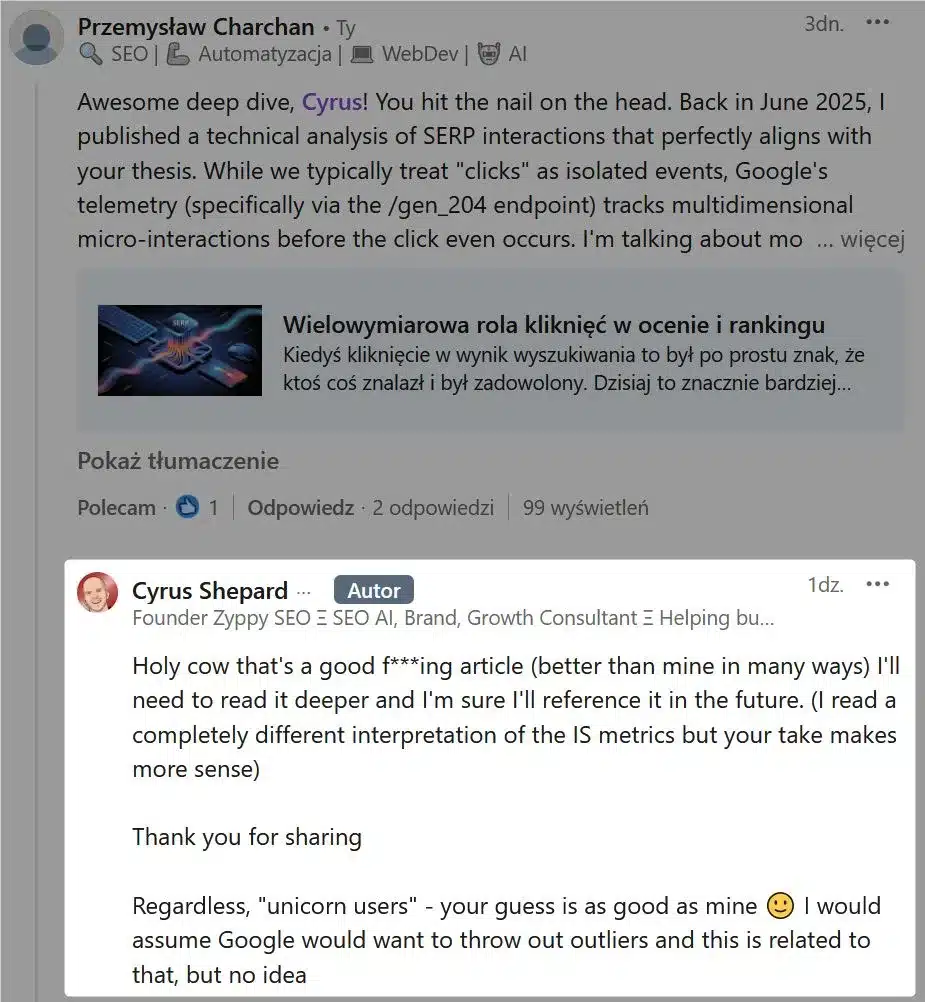
The original version of this article was published on June 23, 2025, in Polish. The research and materials were gathered over a period of more than six months prior to publication. This article was translated into English later, after Cyrus Shepard reviewed this article1 (back when it was still in Polish – respect for that!). That alone is a strong recommendation and a good enough reason to give it a read 🙂
Holy cow that’s a good f***ing article
Cyrus Shepard
User Interactions Are More Than Just Clicks
Google itself acknowledges that ranking is based on three fundamental pillars (as outlined in the „Life of a Click” presentation):
- Document content (body) – what the document says about itself
- External links (anchors) – what the web says about the document
- User interactions – what users say about the document, i.e., how they interact with it
This third pillar is particularly interesting in that it extends far beyond traditional CTR. Google takes into account a much broader spectrum of behaviors that speak to engagement and potential user satisfaction:
- Attention – indicates visual engagement with a SERP element, even without a click. This can be inferred from time spent on the SERP, scrolling (mobile), or hovering over specific elements
- Interactions with other SERP features – e.g., swipes on carousels
- Entering a new query – a critical signal often indicating dissatisfaction with the initial results, prompting the user to reformulate their query
- Clicks – the primary signal representing the user’s choice. Google distinguishes several types of clicks (good, bad, good abandonment)
This shows how user interactions – with clicks as the main indicator – are integrated throughout Google’s search engine: from algorithmic training to product innovation. It’s also clear that Google is trying to understand the holistic experience of the user, not just a single click event. And speaking of clicks – Google categorizes them into different types, which may reflect a sophisticated internal understanding of user intent and overall page quality.
In the Google API Content Warehouse, you can find information about CrapsData:
- clicks and impressions – basic counters for total clicks and impressions
- goodClicks and badClicks – these suggest Google’s ability to classify clicks based on subsequent user behavior or other quality signals
- A „good click” likely leads to user satisfaction or extended engagement on the page
- A „bad click” may result in a quick return to the SERP (so-called pogo-sticking) or an immediate reformulation of the query
- lastLongestClicks – represents clicks that were the last interaction in a query session and led to the longest engagement with the clicked document. This metric directly indicates user satisfaction and the discovery of desired information
- unicornClicks – a subset of clicks associated with an event from a „Unicorn user.” I did a deep dive, and it turns out these are clicks belonging to children’s accounts, presumably for legal reasons. Full research: unicornClicks – a signal of children’s clicks
- absoluteImpressions – counts every single impression separately, providing a very precise picture of the actual number of page views. This allows Google to see the full, unaggregated impression count
- unsquashedClicks – raw click data that has not yet been processed. Google is transitioning to a new format in which this data will be stored
- unsquashedImpressions – raw impression data that has not yet been compressed or merged into larger groups. Currently this field is not fully utilized in the old format, but Google is transitioning to a new format in which it will be used. It’s very likely that this „new format” already exists, given when the Google documentation leak occurred
- unsquashedLastLongestClicks – the number of clicks that were simultaneously the user’s last clicks within a series of related queries and were characterized by the longest time spent on the visited page. This metric is particularly significant because it allows Google to identify those interactions that genuinely captured the user’s attention and delivered a satisfying experience, rather than those followed by a quick return to the search results (pogo-sticking)
The CrapsData also contains attributes such as country, device, language, query, url, and sliceTag, which suggests that click and impression signals are aggregated and analyzed across various dimensions – from country, device, and language to queries and URLs – while sliceTag slices all of this according to different properties. The distinction between good, bad, and „last longest” clicks shows that Google cares about the quality of engagement and user satisfaction. This can be understood as Google having a model that classifies user intent and the outcome following a click. As for the „last longest click,” the matter is also not binary, since a click on a result for the query „news” may be interpreted differently than a click for a „local business” or „scientific research” query.
Similarly, the behavior of mobile users differs from that of desktop users. By categorizing and analyzing clicks across these dimensions, Google can more precisely tailor its algorithms to specific user segments, query types, and device contexts. Take, for example, the magical Google Discover on mobile devices. Scrolling and pausing on a topic for more than ~1 second may provide data to the algorithm that „this topic interested the user” (i.e., the attention module), while navigating to the article is already an explicit engagement signal (i.e., the interaction module). Of course, these are just assumptions, but looking at it from the desktop user perspective, it’s quite plausible.
Google’s Telemetry System
We now transition very smoothly into my original research, which sparked this article. 🙂 My tests show that Google uses a dedicated telemetry system to passively collect data on user interactions. The primary example is the /gen_204 endpoint, to which Google sends a „ping” every time a user interacts with a link in the SERPs.
I believe /gen_204 refers to the HTTP status code 204 „No Content” – it indicates successful data transmission without returning any content, which is actually typical for background analytics requests.
A Multidimensional Interaction Signal
Why did I bold „interacts” earlier? I ran tests using a computer mouse, a keyboard, and a simulation of a Samsung Galaxy S20 running Android 11.
The tests covered „regular results,” sponsored results, AI Overviews, People Also Ask, and the knowledge graph – both while logged into a Google account and while logged out. After analyzing the telemetry data transmitted from the endpoint, it is abundantly clear that user interaction is a multidimensional signal that Google measures with extraordinary precision, going far beyond the simple recording of a click. The tests revealed that beyond merely registering an interaction, Google analyzes the nature, context, and manner of execution:
- Mouse interactions – standard clicks are recorded in detail using parameters such as
ct=slhand an elaboratemeparameter, which provide information about the precise moment, element visibility, and response time - Keyboard interactions – Google actively tracks navigation via keys (TAB, ENTER), as confirmed by parameters such as
m=V,tni, andatni. This also speaks to Google’s commitment to accessibility for users employing alternative navigation methods - Touch interactions (mobile) – the smartphone simulation showed that Google has moved toward gesture tracking. The
meparameter contained signalsS(which can be directly translated as scroll) andG(gesture), as well as detailed data on the position and visibility of elements in the mobile view
But that’s not all, because the tests involving AI Overviews and the knowledge graph add new dimensions to the overall picture. Google employs very advanced telemetry mechanisms to understand every aspect of user interaction.
- AI Overviews are intensively monitored – Google tracks interactions with new AI-based features in great detail, using the dedicated
fidparameter with temporal parameters checking engagement (?) - Tracking of SERP features other than traditional links – interactions with elements such as knowledge graphs are actively tracked, using
vedandvetparameters that encode the visual context and position of the clicked element - Granularity is the standard, regardless of user status – even as a logged-out user, Google collects very detailed data on micro-interactions (
mefrom hovers, scrolling, element positions) and timing (zx,st). This indicates that this data is needed for the basic functioning and optimization of the search engine, independent of any account-based personalization - Data aggregation for understanding satisfaction – all of this data (interactions with AI Overviews, knowledge graphs, mouse movements, clicks) is aggregated and used to build a fuller picture of user intent and satisfaction, which aligns with the philosophy of the CAS model
Telemetry Parameters
The /gen_204 request URLs are rich in specific telemetry parameters, each carrying certain information. After careful analysis of the URLs, I identified the most likely descriptions, then fed them into an AI along with my notes and a request for verification, description, and any additions – which only reinforced my conviction that I was on the right track.
- atyp (action type) – likely indicates the specific type of user action, e.g., a click
- csi – in all likelihood, this is an abbreviation for „Client Side Instrumentation,” a technique for collecting data on the client side
- i (interaction) – probably „interaction”
- atni (active tab navigation index) – a parameter used in the context of keyboard navigation, indicating the currently active element after the Tab key has been used. Its changing value reflects which interactive elements the user is cycling through using the Tab key before making a selection (e.g., pressing Enter). In all likelihood, it monitors accessibility without a mouse
- aqid (active query ID) – an identifier associated with a search query or session
- bb (build / beta version) – may indicate a variant of the mechanism being tested or a specific software build. This allows Google to attribute data to a specific version of code or experiment. [AI description]
- bl (build label) – likely refers to an internal build label or version of the Google software module from which the ping originates. This is another parameter used for debugging and performance analysis by Google engineers. [AI description]
- et (event type) – indicates the registration of some event, in this case a URL click
- ei (event identifier) – a unique identifier for a specific event or session, enabling Google to track individual interactions
- ct (click type) – provides context regarding the nature of the event
- slh (search link hit) – a click on a search link
- backbutton – appeared after clicking the „Back” button in the browser. This is a very important negative signal for Google. It indicates that the user left the target page and returned to the SERP, which is significant for measuring pogo-sticking and evaluating satisfaction with the previously clicked result
- v (version) – the version number of the telemetry data format
- im (interaction mode) – likely shows how the user is interacting
- M – mouse interaction
- pv (Page View) – likely refers to a value related to the visibility of an element on the search page, measuring, for example, the percentage of visibility. Within the CAS model (Clicks, Attention, Satisfaction), the measurement of „attention” is described
- tni (tab navigation index) – a parameter used in the context of Tab key navigation on the client side (CSI / Client Side Instrumentation). Likely tracks the number of Tab presses within a given session or page area
- m (mode) – likely an alternative to the
imparameter- M – mouse interaction
- V – keyboard interaction (virtual)
- G – gesture interaction
- me (Metrics/Events or Measurement Event) – one of the key parameters, containing very detailed data in the form of a structured string. It consists of segments such as event code, timestamp, data type, metrics, and flags. This parameter conveys a set of information about performance, response time, and user interaction. It is the most elaborate and information-rich parameter, containing encoded data about interactions measured in microseconds, the dimensions and positions of elements on the page, the time spent viewing them (so-called attention), and many other details. It is the core of detailed user behavior tracking [AI description]
- S – for the mobile version (scroll)
- G – for the mobile version (gesture)
- 74 – for the mobile version, likely the event code for „tap”
- zx (unix timestamp) – a timestamp in milliseconds recorded in UNIX format
- opi (Operation ID) – likely an identifier associated with a specific operation, session, or page with which the user began a given interaction. If so, this is how Google measures pogo-sticking
- ved (visual element data) – its primary purpose is to provide Google with detailed information about the link the user clicked, its visual context, and its position in the SERP
- vet – similar to the above, this parameter appeared only with AIO, KE, and PAA. Like
ved, it is a complex parameter providing extended visual and contextual data about the clicked element. It may contain more detailed information about the element’s state, its content, or the data that led to its display. Together withved, it forms a powerful tool for analyzing visual interactions - uact (user action type) – represents the type of user action, often specific to interactions with user interface elements or SERP features. Contains a specific code for a particular type of action, possibly related to dynamic elements or interactions unrelated to traditional links. [AI description]
- fid (feature ID) – a unique identifier for a specific Google feature or interface element. In our case, the value
18is a very likely internal identifier for AI Overviews or their specific interactions. It helps Google track the adoption and usage of individual SERP features. [AI description] - st (session time) – likely represents the time spent (in milliseconds) on a given element or page before the ping is sent. Another interpretation is an overall session time. It is certainly an engagement metric
- t – indicates a specific type of trigger or interaction
- fi – likely „first interaction” or „feature interaction.” [AI description]
- nt (navigation type?) – this parameter appeared only when expanding AI Overviews. May indicate the type of navigation event as „expansion”
- reload – indicates that the page or a specific component on the page (in this case AI Overviews) was reloaded or re-rendered. In the context of AIO, this may mean that the section was dynamically loaded on user interaction (in this specific case, the expansion of the summary). This is indisputable evidence that beyond clicks on links, Google also monitors dynamic changes within the SERP
- hl (hreflang) – the commonly known user interface language
- fmt (format) – the format in which the data is sent
- jsbp – it seems to me that this refers to JavaScript Protocol Buffers (a.k.a. protobuf, which is found in the API Content Warehouse). A structured data serialization method created by Google. Takes up less space than JSON / XML
- msc (module service context) – the module responsible for capturing the service context (?)
- gwsrpc – in all likelihood, this stands for Google Web Search RPC, i.e., communication between various components within the search engine
As I mentioned earlier – the sheer number and complexity of the parameters goes far beyond simple click counting. They encompass timestamps, event codes, and various metrics, suggesting that Google is building a rich, multidimensional profile of every user interaction in the SERP. This level of granularity is essential for training sophisticated machine learning models that can infer user intent and subsequent satisfaction by distinguishing between good and bad clicks.
Although the telemetry data is clearly characterized as not being a direct ranking signal, it is hard not to get the impression that its role in search engine optimization and improvement of the user experience has deep and indirect consequences for SEO. If Google uses this data for „quality monitoring and optimization,” it means they are continuously refining the search interface itself based on user behavior, and on top of that, dynamically tailoring displayed content to the needs of specific users – clever. Pages that deliver better UX (e.g., optimized meta titles and descriptions, faster loading, concrete content, intuitive navigation) will naturally lead to more „good clicks” and higher user satisfaction.
If my assumptions are indeed correct, then positive user signals correlate with other, more direct ranking signals (is pogo-sticking one of them?). It seems to me that optimization focused on user experience and grounded in an understanding of these telemetry signals from Google must become an indirect SEO strategy.
The CAS Model: Clicks, Attention, and Satisfaction
Developed by Google Research Europe, the Clicks, Attention and Satisfaction (CAS) model is an advanced SERP evaluation system that goes beyond traditional click-based metrics, jointly capturing click behaviors, user attention, and their satisfaction, offering more accurate predictions of user actions and self-reported satisfaction. CAS integrates 3 main elements of user behavior:
- C (Clicks) – analyzes whether and what the user clicks on
- A (Attention) – measures what the user pays attention to on the search results page
- S (Satisfaction) – assesses the user’s overall satisfaction with the results obtained
Evidently, „traditional metrics” are becoming insufficient in a landscape where answers to questions can be found directly in knowledge panels, featured snippets, or other interactive elements without the need to click any link at all – AI Overview being one example.
Additionally, the problem that CAS addresses is the fact that it is also wrong to assume „click = success.” The CAS model solves 2 problems:
- Non-linear attention patterns – users no longer scan results in a linear fashion, i.e., from top to bottom. Visual elements such as images, maps, video panels, and ads attract the eye and disrupt the traditional „F” pattern. The CAS model accounts for non-linear attention patterns (most commonly measured with eye-tracking technology in studies) to understand which SERP elements are actually noticed and how they influence user decisions.
- Good Abandonment – the user types a query (e.g., „weather in Warsaw”), receives the answer directly on the results page, and leaves the search engine satisfied without clicking any link. Under the old model, this would be a failure signal (zero CTR). The CAS model is able to identify such a situation as a success, because the user achieved their goal and is satisfied.
CAS Model Components
The CAS model is divided into several components, each serving a different function.
Click Model (C – Clicks)
Clicks are still important, but their context matters more. The CAS model views a click as part of a whole, for example:
- A positive signal is clicking a link and staying on the target page for an extended period (so-called „long click”)
- A negative signal is clicking a link and immediately / quickly returning to the results page to click on something else. This is a clear signal that the first result did not meet expectations. I’ve already mentioned pogo-sticking several times.
Attention Model (A – Attention)
For a SERP element to be clicked – it must first be examined and deemed attractive. This seems like a genuine revolution. The CAS model does not assume that you see and evaluate all results in order, because different elements compete for the user’s attention. The model predicts the probability with which a user will pay attention to a given element, based on:
- Position – a higher position still has an advantage
- Appearance – visual elements such as images, video, featured snippets, or knowledge panel frames naturally attract the eye
- Result type – a user scans a news block differently than a list of local businesses on a map
The attention model is trained to optimize the full data likelihood, including mouse movements, clicks, and satisfaction labels, acknowledging that mouse movements alone do not capture all attention (e.g., currency conversion queries with no mouse movements but with reported satisfaction).
Satisfaction Model (S – Satisfaction)
The most important component of the model, in which satisfaction is inferred from the entire sequence of interactions (or their absence). Satisfaction is viewed as an event – the sum of preceding actions (Click, Attention) – where utility can be obtained by clicking on relevant results and/or directly examining good SERP elements. The total utility is calculated from direct SERP elements and clicked documents.
- Example 1 (high satisfaction):
- The user types „capital of Poland”
- Attention focuses on the knowledge panel displaying „Warsaw”
- No click = the user leaves the page
- Conclusion? The user is satisfied
- Example 2 (low satisfaction):
- The user types „how to rank a website on Google”
- Attention focuses on the first result, then the user clicks on it
- After 5 seconds, the user returns to the SERP and clicks on a different link
- Conclusion? The first result was not satisfying and the user continues searching
The concept of „good abandonment” redefines „no click” and challenges the traditional assumption that a lack of clicks means failure or dissatisfaction. Thanks to modern SERP features (knowledge panels, featured snippets), users can find answers directly on the results page without needing to navigate away. This means that a „zero-click” search can actually be a very successful and satisfying experience (for the user, not the publisher).
The integration of clicks, mouse movements (as an indicator of attention), and explicitly self-reported user satisfaction in the CAS model showcases a multi-element approach to understanding user behavior. Relying on a single signal (such as clicks) does not provide a complete picture.
By combining behavioral data (clicks, mouse movements) with cognitive data (satisfaction reports) and human relevance ratings, Google gains a much richer and more accurate understanding of user intent, engagement, and outcome. This allows for the development of evaluation metrics that are more aligned with actual user utility.
Measuring Search Quality: IS4@5 in Brief
In another document from the Department of Justice proceedings, the testimony of Pandu Nayak (Chief Scientist for Search at Google) and the response of Professor Douglas W. Oard provide valuable insights into search. Google acknowledges that traditional metrics – such as IS4@5 – while useful, have significant limitations.
What IS4@5 Is
IS4@5 is an abbreviation for „Information Satisfaction for the top 5 results.” According to available information, IS4@5 is a metric that Google uses to evaluate the top five positions (the so-called TOP5). This metric encompasses both „blue links” and special search features such as „OneBoxes.” The values of this metric are closely tied to the analysis of detailed user interaction data collected via the /gen_204 endpoint. Google trains its ranking components (Navboost, RankBrain, DeepRank, QBST, and Term Weighting) with the goal of maximizing scores or fine-tuning based on IS (Information Satisfaction).
IS is the overarching concept to which IS4@5 refers, and these scores reflect how well the user satisfied their intent, taking into account all their interactions with the SERP – including instances of „good abandonment,” where the answer was found directly in the results. The IS4 metric is recognized as an „approximation of utility for the user,” which aligns with the goals of the CAS model in comprehensively measuring user behavior. This means that the search engine is trying to find the „best” document while at the same time ensuring that the presentation of results in the SERP leads the user to a quick and effective resolution of their information need.
Google employs a diverse set of metrics to evaluate search quality, emphasizing „real value for the user supported by accurate analysis and other metrics”, and these include:
- PQ (Page Quality) – this metric is found in the search quality rater guidelines and in the API Content Warehouse. While raters provide subjective assessments consistent with the guidelines, IS offers objective insight into actual user behavior. Drawing on billions of clicks and interactions, IS provides an equally detailed picture of satisfaction as static human ratings
- Side-by-Sides – comparative experiments between different search systems
- Live Experiments (LE) – a method for evaluating search quality and understanding user intent in real time
- Freshness – the „freshness” of information is an independent factor affecting the quality of queries requiring the most up-to-date data. This refers directly to current information, such as news, recurring events, queries about products, and questions about celebrities and politicians
Excerpts from Pandu Nayak’s Testimony
The following schema applies: question / answer
Google’s Chief Scientist for Search, in October 2023, indicated, among other things, that IS is the key top-level indicator of the entire SERP. To quote:
- So IS is Google’s primary top level measure of quality, right?
- Yes.
This clearly states that IS is a component of result quality evaluation and the overarching concept measuring how effectively Google satisfies the user’s needs.
- And sometimes IS-scored documents are fed – used to train the different modules, models in Google search stack, right?
- Yes.
This confirms the direct link between IS and the machine learning process. IS, as a satisfaction indicator, becomes a label for documents, showing algorithms (such as Navboost, RankBrain, DeepRank, QBST, and Term Weighting) which results are good and which are bad from the user’s perspective. In other words: interaction data feeds IS, and IS helps the algorithms learn.
- And sometimes – and – but IS rating has different pros and cons compared to using click data to train those same systems, right?
- Yes.
High user satisfaction is the goal Google wants to achieve. IS is the result of analysis. As such, it can account for „good abandonments” and serves as a general measure of utility.
- One advantage of click data has over IS data is clicks give a measure of the actual user performance?
- That is correct.
Click data (/gen_204, me, im, pv, tni, atni, etc.) represents „actual user performance.” These are the raw input data that show how the user interacts. Clicks, mouse movements, scrolling, gestures – these are all objective observations of behavior.
- And then it’s fine-tuned on IS data?
- That is correct.
This confirms that RankBrain, after its initial training (likely on raw query and click data), is fine-tuned and optimized for user satisfaction as measured by IS. RankBrain learns how to modify ranking (e.g., through understanding synonyms and context) so that users are as satisfied as possible with the results.
- But it is not possible to train RankBrain on only human rater data, right?
- No, you can’t.
This means that actual user interaction data (click data) is irreplaceable. Although raters who supply PQ data are important for calibration and understanding quality, their data is too small in volume to effectively train RankBrain. The conclusion is clear – only billions of real interactions can supply sufficient signals for such complex training. This only confirms that the overall user interaction in the SERP collected via /gen_204 is absolutely indispensable fuel for the RankBrain algorithm.
- Now, the navboost system memorizes past clicks that have been issued for past queries, right?
- Yes.
- It’s trained on user data?
- Yes, it is.
Navboost is an algorithm discovered during Google’s antitrust proceedings with the US Department of Justice. Navboost is a memory system focused on Google search results and based on user data. From this description, one can infer that Navboost bases its operation partly on historical click data.
- And for years, RankBrain was trained on 13 months worth of click and query data; is that right?
- I think initially it started with the same amount as navboost, yes.
This record shows just how extensively data is used to train RankBrain – 13 months of click and query data is an enormous volume of data! It also indicates a historical connection with Navboost, which also relies on click data. Yet another confirmation that raw interaction data is highly important and is collected over an extended time horizon.
- RankEmbed BERT is trained on click and query data, right?
- Yes, it is.
Again, confirmation that BERT is grounded in real user interaction data, which forms the basis of RankEmbed BERT’s learning. In other words: how people actually formulate queries and what content they find relevant.
- And then it’s fine-tuned on human IS rater data?
- Yes, it is.
RankEmbed BERT is precisely fine-tuned on IS data from raters. This means that after initial training on vast behavioral datasets, the model is „calibrated” on a smaller but highly precise set of human expert ratings to align even more closely with the definition of „information satisfaction.”
- I see. And then you figure out which ones they click on so you can use that to determine which are the better results?
- Yeah, and so there’s a particular technique to decide which side is better.
Google employs advanced analytical techniques for interpreting click data. This allows for precise identification of which results are truly valuable and satisfying to users, going beyond the basic measure of counting clicks.
- That would be an example of using click data to run an experiment?
- Yes.
Click data is actively used in controlled Google experiments, enabling continuous testing and refinement of algorithms based on current user behavior in real time.
The Overarching Conclusion
Based on the excerpts from Pandu Nayak’s testimony, one can unequivocally emphasize that user interactions are the absolute and irreplaceable fuel for Google’s algorithms. Every algorithm learns, fine-tunes, and continuously evolves thanks to behavioral data supplied by users. IS is the primary quality measure, but it is precisely the historical and current user interaction data (/gen_204 and its parameters) that constitute the best foundation for predicting and satisfying information needs with ever-greater precision, and in real time. In summary, every interaction we have becomes an invaluable signal that dynamically shapes search results.
Correlating Clicks with Topic and Popularity
Google’s patent (US8595225B1) was on my list of documents before it expired in May 2025, but I get the sense that it fits perfectly into the overall article and is worth mentioning. The fact that it has expired does not mean that Google no longer practices these methods.
The patent describes an advanced ranking mechanism that makes search results more relevant in niche topics. Its operation is inextricably linked to the analysis of user behavior in the SERP, since it is precisely these interactions that supply the input data for calculating popularity. This is not about general popularity in the vein of number of links or clicks, but rather a document’s popularity within a specific topic or category.
In the patent, one can find the following:
one or more instructions to use at least one of user navigational patterns to each document, of the plurality of documents, or user navigational patterns from each document, of the plurality of documents, to determine the first popularity score.
The phrase „user navigational patterns” directly refers to user behaviors in the SERP, which were already described earlier in this article.
Although the patent dates from 2013, the term „navigational patterns” is broad enough to also encompass more modern signals – for instance, the time a user’s cursor spends hovering over a given result in the SERP before clicking it, as this is a certain indicator of interest. A similar indicator may be – as I already mentioned – pausing over a headline while scrolling through Google Discover, as this too is an element of interest (attention).
Core Assumptions and Mechanisms of the Patent
- Core assumption: context matters
- The central premise of the patent is that a website’s authority and popularity are relative and heavily dependent on its topic. In other words, Google evaluates a given page by comparing it to others with similar subject matter. I think we can now speak in terms of semantic document spaces (the so-called „Semantic Document Space”).
- Two-stage popularity assessment – instead of a single general popularity indicator, the patent introduces a two-stage system:
- Base popularity (First Popularity Score) – a preliminary popularity assessment of a document based primarily on raw data, and mainly on user behavior. The patent explicitly mentions the use of „user navigational patterns to each document” or „user navigational patterns from each document” to determine the popularity score. This means that data from the
/gen_204endpoint and theme,pv,opiparameters may serve to calculate popularity. As a reminder, the API Content Warehouse contains 7 different click indicators (clicks, goodClicks, badClicks, lastLongestClicks, unsquashedLastLongestClicks, unicornClicks, unsquashedClicks) - Topical popularity (Second Popularity Score) – a score that has been normalized (i.e., is no longer raw data) and calibrated within a specific subject category. This means that contextual popularity has a direct impact on how highly a document appears in search results
- Base popularity (First Popularity Score) – a preliminary popularity assessment of a document based primarily on raw data, and mainly on user behavior. The patent explicitly mentions the use of „user navigational patterns to each document” or „user navigational patterns from each document” to determine the popularity score. This means that data from the
Conclusions
An in-depth analysis of the topic reveals that „clicks,” despite being foundational, are far from a simple metric. Google meticulously collects, categorizes, and analyzes a broad spectrum of user interactions (clicks, attention, scrolling, mouse hovers, keyboard navigation, new queries, good/bad clicks, last/longest clicks, and children’s clicks under the unicornClicks label) to understand user behavior at the most granular level possible. User interaction data is the foundation for training and fine-tuning core ranking components such as Navboost and RankBrain.
The CAS model underscores the shift from raw click-through rates to a holistic understanding of satisfaction, accounting for „good abandonments” and leveraging explicit user feedback. The patent regarding topical popularity further emphasizes the contextualization of popularity signals, ensuring relevance for specific query topics.
The deep integration of user interaction data into evaluation and ranking systems highlights how significant this data is in optimizing the user experience both within and beyond the SERP. This encompasses fast page load times, clear and concise content, intuitive navigation, and overall user satisfaction.
Google’s continuous cycle of innovation is directly driven by user data, which informs everything from identifying areas for algorithmic improvement to making strategic decisions about deploying new features.
Strategic SEO Directions
- Holistic UX optimization – every publisher must move beyond traditional keyword and link-building tactics to prioritize the comprehensive user experience. This includes optimizing for SERP engagement (snippet quality, rich results) and post-click satisfaction (page speed, content quality, strong CTAs, meta title / description)
- Understanding user intent – deep understanding of intent is paramount, as Google’s algorithms are getting better and better at recognizing satisfaction and relevance
- Adopting diverse metrics – every site owner / SEO specialist should analyze a broader range of signals. Reduce the bounce rate while increasing time on page or site depth – all in order to avoid sending negative user signals to Google
- Strategy for „good abandonments” – for certain queries, providing direct, concise answers in snippets or structured data may lead to „good abandonments,” which are in fact positive signals, even when the user does not click through to the website. This may have broader implications for positioning the page as a whole document rather than just one specific page, taking into account the patent described earlier
Google’s investment in understanding and leveraging user interactions – with clicks as the direct signal – cements user behavior as the cornerstone of modern search quality. For the entire marketing industry, this means a strategic shift toward deeply user-centric approaches. We must prioritize the quality of engagement and the ultimate satisfaction of the user, because it turns out that Google has – (un)wittingly – turned its search engine into a kind of „behavioral-automated micro-voting” system, one that informs the entire mechanism determining at which position a specific document / page should appear.
- Cyrus Shepard reviewed this article. Link to the comment on LinkedIn ↩︎