
Google indexes pages with the gtm_latency=1 parameter, and it shouldn’t!
- 🇬🇧 English
- 🇵🇱 Polski
The original article was written in Polish on January 7, 2026.
It all started with one line in the server logs.
While reviewing Googlebot traffic on one of the analyzed sites, I noticed something strange. The bot was visiting URLs with a ?gtm_latency=1 parameter that wasn’t anywhere in the site’s structure:
- I don’t have this parameter in internal linking
- No sitemap contained it (or contains it)
- The
?gtm_latency=1parameter literally appeared out of nowhere, or rather was added by Googlebot itself, which I found out later
Googlebot first visited an address with this parameter on August 15, 2025 at 01:49.
A quick Google search yielded no answers. There’s no information about it in the Google Tag Manager documentation. SEO forums don’t know about it. I asked SEO specialists I know but they don’t know the parameter either. On exactly August 18, 2025, I asked the LinkedIn community… well, there was an attempt to help but I was getting similar claims from AI, which didn’t satisfy me at all because it falls under hallucinations.
Then on August 21, 2025, I wrote a new post on LinkedIn explaining what the ?gtml_latency=1 parameter is with some technical information and a protip not to block this parameter in robots.txt
I waited a month and on exactly Sep 22, 2025 at 13:48:03 a new publication appeared on LinkedIn, this time in English, in which I directly tagged personalities like Barry Schwartz and John Mueller asking about this parameter because Google had already indexed over 166k pages.
I asked:
- What’s behind the growing indexing of pages with the gtm_latency parameter?
- Two years ago, Gary Illyes mentioned that GoogleOther was meant to relieve the main index of tasks not related to search. Has anything changed in how GoogleOther affects search results?
However, I didn’t get an answer, and my post was… ignored 🥲
Why should every SEO specialist care about this?
If you work in SEO, you know how important it is to control what gets into the index. Duplicate content, cannibalization, crawl budget, render budget are the foundations of technical SEO, and here we have a situation where:
- Google itself generates URL variants by adding diagnostic parameters
- These variants get into the index even though they shouldn’t
- Pages without proper canonical can have a real problem with duplication
- Nobody’s talking about it!
So I’m starting 🙂
What is ?gtm_latency=1
I dug through probably half the internet looking for an explanation and found literally nothing. The topic is practically absent from the public space. A few people asked similar questions, but without answers. The official Google Tag Manager documentation is silent on this. You won’t find it in any guide, FAQ, or help article. I decided to look at the gtm.js source code – this is the file that Google Tag Manager loads on every page with an installed container.
What is the ?gtm_latency=1 parameter
?gtm_latency=1 is an internal diagnostic parameter of Google Tag Manager that activates extended collection of telemetric data about the performance and behavior of tags on the page.
Simply put: it’s a switch that tells GTM „enable full monitoring mode”.
⚠️ Very technical content regarding gtm.js file analysis – if you’re interested, you can expand this section
gtm.js code analysis
The gtm.js script is compressed, which means variable names are shortened to single letters or short strings. Nevertheless, by analyzing the code logic, I reconstructed its operation.
The most important fragment looks like this:
function il(a) {
var b = String(a[mf.Na] || "").replace(/_/g, "");
return Kb(b, "cvt") ? "cvt" : b
}
var jl = x.location.search.indexOf("?gtm_latency=") >= 0 ||
x.location.search.indexOf(">m_latency=") >= 0;
var kl = Math.random(),
ll, ml = dj(27);
ll = jl || kl < ml;
var nl, ol = dj(42);
nl = jl || kl >= 1 - ol;
var pl = function(a) {
pl[" "](a);
return a
};
pl[" "] = function() {};In GTM code, three variables control the level of data collection:
| Variable | Meaning | When active |
|---|---|---|
jl | Whether gtm_latency= parameter is in URL | Always when parameter present |
ll | Basic performance logging | When jl=true OR randomly 0.5% of sessions |
nl | Extended telemetry | Practically only when jl=true |
Random 0.5% sample mechanism
Even without the parameter in the address, GTM automatically enables basic diagnostics (ll) for 0.5% of all sessions:
var kl = Math.random();      // random value 0-1
var ml = dj(27);             // = 0.005 (i.e. 0.5%)
ll = jl || kl < ml;          // true if drawn < 0.005
This means that:
- 99.5% of sessions are standard GTM operation, minimal telemetry
- 0.5% of sessions have randomly activated basic performance logging
- 100% of sessions with
?gtm_latency=1have full diagnostics forced by the parameter
What does this mean at scale?
Let’s take as an example a site with 10,000 sessions per day:
- 50 sessions per day will be subject to basic diagnostics
- The site owner won’t see any parameter in the URL
- The user won’t see any difference in how the site works
- Telemetric data will be sent to Google
On the scale of the entire internet – millions of sites with GTM, billions of sessions – Google collects huge amounts of data about Tag Manager performance without any visible interaction.
Forcing full diagnostics
When ?gtm_latency=1 appears in the URL address, the jl variable takes the value true. This in turn forces:
ll = true— activation of basic loggingnl = true— activation of extended telemetry
The nl flag under normal conditions is almost always disabled (because ol = 0, so kl >= 1 practically never occurs for Math.random()). The only way to activate it is the presence of the gtm_latency parameter in the URL, which makes ?gtm_latency=1 a full diagnostic mode switch.
What exactly does GTM measure in diagnostic mode
Code analysis reveals that activating the ll and nl flags triggers the collection of a wide range of data:
Performance and execution times
| Parameter | Meaning |
|---|---|
slo | Script Load Order – script loading sequence |
hlo | HTML Load Order – HTML element loading sequence |
lst | Load Script Type – type of loaded script |
tr | Tag Runtime – execution time of individual tags |
ti | Tag Identifier – identifiers of fired tags |
Tag execution statuses
| Code | Status |
|---|---|
1 | Tag started execution |
5 | Tag completed successfully |
6 | Tag completed with failure |
7 | Exception during execution |
Consent Mode compliance
| Parameter | Meaning |
|---|---|
gcs | Google Consent Status |
gcd | Google Consent Details |
dma | Digital Markets Act compliance |
gdpr | GDPR / RODO |
gdpr_consent | GDPR / RODO consents |
Container and session data
| Parameter | Meaning |
|---|---|
id | GTM container identifier (e.g. GTM-XXXXXX) |
pid | Process ID – process identifier (refreshed every 24h) |
cv | Container Version – container version |
tag_exp | Tag Experiments – active experiments |
bt | Behavior Type – container behavior type |
ct | Container Type – container type |
Who uses parameter forcing?
Based on my observations, the ?gtm_latency=1 parameter is added by:
- GoogleOther – during page crawling (more on this later)
- Developers and analysts – consciously, for debugging GTM problems
- Unaware users who clicked on a link with this parameter (e.g. from an indexed page)
The first case is the most interesting because it forms the core of this investigation.
| Aspect | Random 0.5% sample | Parameter forcing |
|---|---|---|
| Activation | Automatic, random | Conscious / via URL |
Flag jl | false | true |
Flag ll | true | true |
Flag nl | false | true |
| Data scope | Basic | Full |
| Visibility | Invisible to user | Visible in URL |
| Probability | 0.5% of sessions | 100% when parameter present |
Why does Google need two modes?
This is my interpretation based on code analysis:
Random mode (0.5%) serves to:
- Continuous monitoring of GTM performance in „natural conditions”
- Collecting statistics without affecting user behavior
- Detecting global performance problems
Forced mode:
- Detailed diagnostics of specific pages
- Testing Consent Mode compliance
- Auditing tag configuration correctness
- Debugging problems reported by users
Two modes = two goals. One works in the background on a sample, the other is a tool for deep analysis.
Where does this data go
Collected data is sent in the form of a tracking pixel to the endpoint:
https://www.googletagmanager.com/td?id=...&v=3&t=t&pid=...By analyzing payloads captured in DevTools, you can identify the structure of collected data. However, there’s quite a bit of it and it blurs the main thread, so I won’t cite specific parameters.
However, it’s worth paying attention to the HTTP headers returned by the telemetry endpoint:
HTTP/3 204
date: Thu, 21 Aug 2025 08:47:40 GMT
pragma: no-cache
expires: Fri, 01 Jan 1990 00:00:00 GMT
cache-control: no-cache, no-store, must-revalidate
content-type: text/plain
cross-origin-resource-policy: cross-origin
server: Golfe2
content-length: 0
From the above you can read several things:
- Status 204 No Content – server accepted data but returns no content – standard
- Aggressive cache-control – data should not be cached
expiresdate in the past (1990) – additional protection against caching- Server: Golfe2 – Google’s internal server name
I wrote a separate article about Google telemetry in SERP based on Google API Content Warehouse technical documentation, academic research, a patent and materials disclosed in legal proceedings, as well as my own tests. I invite you, because there’s a lot to read!
TL;DR – clicks in Google affect page positions, as does time to return to SERP
What Google knows thanks to GTM telemetry
By collecting data from diagnostic mode, Google gets a complete picture:
About the site:
- URL and structure
- GTM container version and configuration
- Active experiments
About performance:
- Script loading times
- Resource loading sequence
- GTM position relative to other scripts
About tags:
- List of all tags in the container
- Execution status of each tag (success/failure/error)
- Execution times
- Dependencies between tags
About consents:
- Consent Mode state
- GDPR/RODO and DMA compliance
- Consent change history
- Impact of consents on tag execution
About errors:
- Which tags report errors
- Types of errors (exception, failure)
- Error context
The question is: who and why adds this parameter to URLs during crawling?
GoogleOther – the bot that was supposed to be invisible
In 2023, Gary Illyes from Google officially announced the introduction of a new user-agent: GoogleOther.
Its task was to relieve the main Googlebot from tasks not directly related to the search engine. GoogleOther is a bot designed for research and development (R&D) purposes – testing, experimenting, collecting diagnostic data.
Gary Illyes on GoogleOther
We’ve added a new bot, GoogleOther, to our list of bots, which will eventually relieve Googlebot. It’s a useless change for you, but I still think it’s interesting.
By optimizing how and to what extent Googlebot indexes, we wanted to ensure that Googlebot’s indexing tasks are used exclusively internally to build the index used by the search engine. To this end, we added a new indexing bot, GoogleOther, which will replace some of Googlebot’s other tasks, such as indexing for R&D work, to free up some indexing resources for Googlebot.
The new bot uses the same infrastructure as Googlebot, and thus has the same limitations and features: host load limitations, robotstxt (though a different user agent token), HTTP protocol version, download size, and so on. It’s basically Googlebot under a different name.
On April 20, 2023, Gary Illyes wrote this on his LinkedIn profile
It’s a logical solution, since if Google wants to test pages, check performance, conduct technical audits – this shouldn’t affect what users see in search results.
The theory sounds reasonable. Practice looks different.
Data from server logs
Analyzing server logs for pages where I noticed the ?gtm_latency=1 parameter, I identified the following patterns:
| Parameter | Value |
|---|---|
| IP addresses | 66.249.74.41, 66.249.74.42, 66.249.74.43, 66.249.74.32 |
| IP range | Confirmed as belonging to Google |
| User-Agent | GoogleOther |
| Crawler type | Special (not main Googlebot) |
| Number of visits (sample site) | 47 in the analyzed period |
Observation:
The ?gtm_latency=1 parameter is added by the GoogleOther bot – exactly the one that according to Google was supposed to be separated from the main index.
The R&D bot performs a GTM diagnostic test. This fits its purpose.
The problem appears in the next step.
URLs leak into the main index
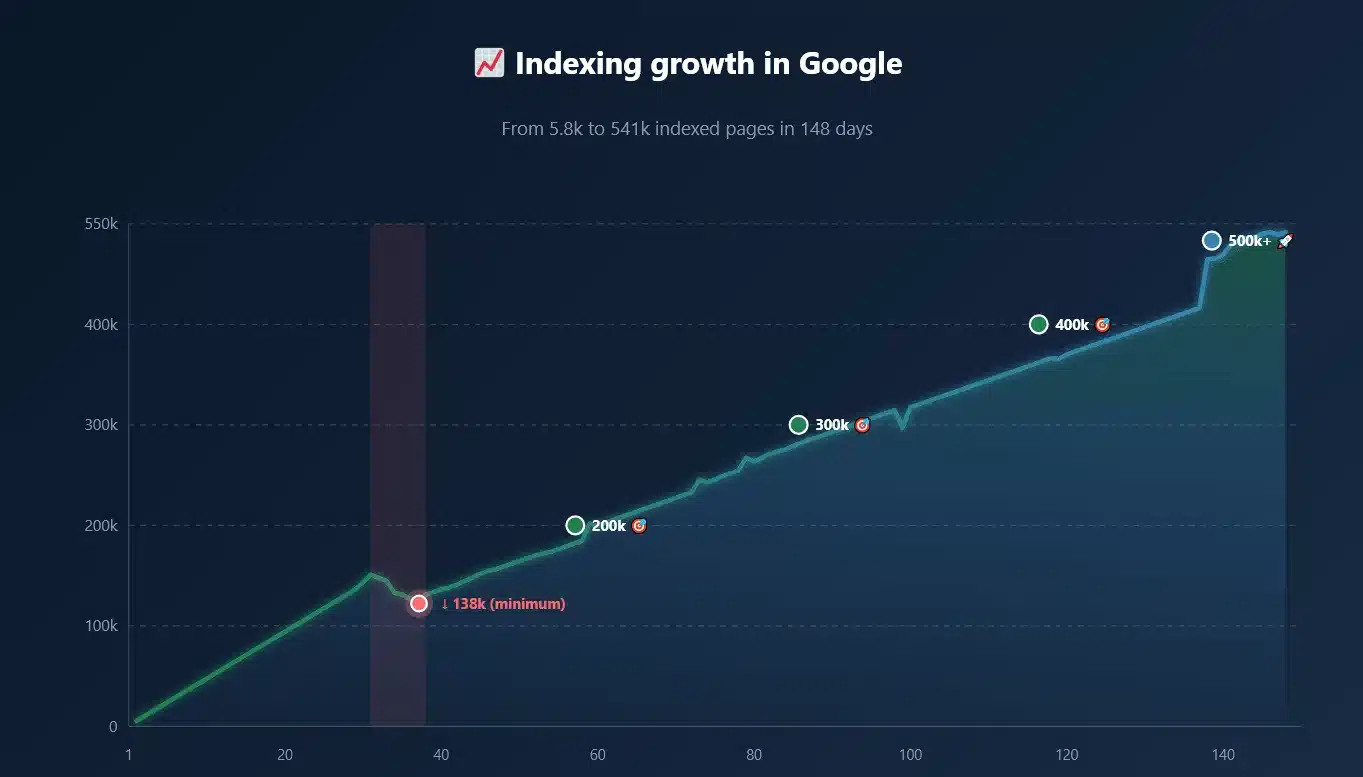
I checked how many pages with the ?gtm_latency=1 parameter are in the Google index:
inurl:gtm_latency=1Growth timeline:
| Moment | Number of indexed URLs |
|---|---|
| Start of observation | ~5,000 |
| 2 days later | ~18,000 |
| 4 months later (01.11.2026) | 541,000+ |
Half a million URLs with a diagnostic parameter in Google’s main index.
📈 Indexing growth in Google
From 5.8k to 541k indexed pages in 148 days
This shouldn’t happen in my opinion 🙂
Is this a bug?
Unfortunately, there is no official Google statement on this matter. I tried to get an answer:
- I tagged Barry Schwartz on LinkedIn – no response
- I tagged John Mueller on LinkedIn – no response
- I searched official Google channels – no mention of the problem
I can only speculate based on observations:
Hypothesis 1: This is an unintended bug
GoogleOther was supposed to be isolated, but somewhere in the indexing pipeline there’s a „leak” – URLs visited by GoogleOther end up in the main index contrary to assumptions.
Hypothesis 2: Policy change
Google changed how GoogleOther works but didn’t communicate it publicly. URLs are now intentionally indexed.
Hypothesis 3: Partial isolation
GoogleOther is separated only for some types of crawls but not for all. Crawls with the ?gtm_latency=1 parameter slip through the system.
Without an official Google statement, we remain in the realm of speculation.
Potential SEO consequences
Regardless of the cause, the fact remains: over half a million URLs with a diagnostic parameter are in the Google index. What does this mean for site owners?
Problem 1: Content duplication
Every URL with ?gtm_latency=1 is a potential duplicate of the page without the parameter:
site.com/product/name/                ← original
site.com/product/name/?gtm_latency=1  ← duplicate in index
If the site doesn’t have a properly configured rel="canonical" tag, Google may:
- Treat both versions as separate pages
- Split ranking signals between them
- Choose the „wrong” version as canonical (small chances but probable)
Problem 2: Keyword cannibalization
Two versions of the same page can compete for the same keywords:
Problem 3: Crawl budget
Every URL that Google indexes is a URL it must crawl. For large sites:
- 10,000 product pages = potentially 10,000 additional URLs with the parameter
- Doubling the number of URLs to crawl
- Slower discovery of new content
- Slower refresh of existing pages
- Worse result related to render budget
Problem 4: Report pollution
In Google Search Console there may appear:
- Pages marked as „Indexed, not submitted in sitemap”
- Discrepancies in data between URL versions
Note: In my observations, pages with ?gtm_latency=1DID NOT appear in GSC – they were only visible in server logs. This may mean that Google treats them differently, or that the problem is not yet fully visible in standard tools, or that only results directly from the main Googlebot go to GSC, and GoogleOther has no connection with GSC.
Problem 5: Users land on diagnostic URLs
If a URL with the parameter is indexed, it may appear in search results. The user clicks and lands on a page with the parameter, and then:
- Shares the URL with the parameter
- Links to the URL with the parameter
- Bookmarks the URL with the parameter
The parameter spreads and not through direct Google action!
Canonical analysis – what the data showed
I conducted an audit of 142 randomly selected addresses with the ?gtm_latency=1 parameter visible in the Google index:
| Canonical state | Number of pages | % of sample |
|---|---|---|
| ✅ Canonical points to URL without parameter | 110 | 77.5% |
| ❌ No canonical tag | 15 | 10.6% |
| 🔥 Canonical points to URL WITH parameter | 9 | 6.3% |
| 🤔 Canonical points to homepage (error) | 1 | 0.7% |
| 💀 HTTP errors (403, 404, 405, 504) | 7 | 4.9% |
Interpretation:
- 77.5% of pages are „safe” – even if the URL with the parameter is in the index, Google should respect the canonical and show the correct version in results
- 10.6% of pages have no protection – lack of canonical means Google decides itself which version is „canonical”
- 6.3% of pages have a serious problem – canonical points to URL with parameter, which may perpetuate duplication
- 0.7% have incorrect configuration – canonical to homepage instead of the proper subpage
- 4.9% return errors – which may generate additional indexing problems
Recommendations and protips, my solutions to this problem
Since I now know the mechanism behind ?gtm_latency=1, the scale of the problem and potential SEO consequences, it’s time to answer the most important question: what to do about it?
Below I present specific recommendations based on my observations and analysis of the problem.
This is the absolute foundation of technical SEO hygiene. I have several scenarios:
Scenario A – Canonical configured correctly:
<!-- On page: site.com/product/name/?gtm_latency=1 -->
<link rel="canonical" href="hxxps://site.com/product/name/" />
Google sees canonical pointing to version without parameter. In most cases:
- Respects the canonical setting
- Will display the version without parameter in search results
- Will consolidate ranking signals on the proper URL
Scenario B – No canonical:
<!-- On page: site.com/product/name/?gtm_latency=1 -->
<!-- No canonical tag -->
Google doesn’t receive a signal about the canonical version. It must decide itself:
- Which version is „better”
- Which to display in results
- How to split ranking signals
In practice, it may choose the version with the parameter as canonical. Especially if it was indexed first!
Scenario C – Canonical points to itself (self-referencing with parameter):
<!-- On page: site.com/product/name/?gtm_latency=1 -->
<link rel="canonical" href="hxxps://site.com/product/name/?gtm_latency=1" />
This is the worst scenario. Google receives a clear signal: „Version with parameter is the canonical version” – this perpetuates duplication
How to conduct a canonical audit
Step 1: Check if your site is affected by the problem
Search in Google:
site:yourdomain.com inurl:gtm_latency=1If the results are empty, with high probability the site doesn’t have indexed URLs with this parameter at the moment.
If results appear – you have confirmation of the problem and a list of specific URLs to check.
Step 2: For each URL found, check the canonical
Canonical should point to URL without the ?gtm_latency=1 parameter.
Problematic states:
<!-- PROBLEM: No canonical tag -->
<!-- (nothing found) -->

<!-- PROBLEM: Canonical with parameter -->
<link rel="canonical" href="https://yourdomain.com/path/to/page/?gtm_latency=1" />

<!-- PROBLEM: Canonical to homepage instead of proper subpage -->
<link rel="canonical" href="https://yourdomain.com/" />
Step 3: Check canonical implementation across the entire site
The problem may concern not only pages already indexed with the parameter but the entire logic of generating canonical tags.
Typical implementation errors:
| Error | Description | How to detect |
|---|---|---|
| Dynamic canonical | Canonical generated dynamically based on current URL (including parameters) | Open the same page with different parameters |
| No canonical on some templates | Some page types (e.g. internal search results) don’t have canonical | Check different templates: homepage, category, product, article, search |
| Relative URL in canonical | Use of relative path instead of full URL | href="/product/name/" instead of href="hxxps://domain.com/product/name/" |
| HTTP instead of HTTPS | Canonical points to HTTP version when site runs on HTTPS | Check protocol in href |
❌ Recommendation 2: DO NOT block the parameter in robots.txt
This is the wrong approach. Don’t do it, here’s why I think so.
Reason 1: robots.txt blocks crawling, not indexing
This is a difference that many SEO specialists don’t fully understand:
- robots.txt → Tells bots: „Don’t visit this page”
- Bot doesn’t crawl the page but…
- …if the page is already in the index or has external links…
- …Google MAY continue to display it in results (without snippet)
By blocking ?gtm_latency=1 in robots.txt:
- Googlebot won’t crawl those URLs
- But if the URL is already in the index – it will remain in the index, because Google doesn’t see it shouldn’t be indexed
- If the URL has external links – Google may display it with the annotation „Description unavailable due to robots.txt”
- You won’t solve the duplication problem, only make it worse
Reason 2: You’re blocking access to diagnostic data
The ?gtm_latency=1 parameter serves Google to collect data about GTM performance. By blocking it:
- Google can’t conduct a performance audit of the site
- You lose potential benefits from GTM optimization on Google’s side
- You may be unknowingly excluded from certain optimizations
Reason 3: You may block more than you intend
Rules in robots.txt can have unintended consequences:
# Attempt to block parameter
Disallow: /*?gtm_latency=1
# BUT this rule may also block:
# /page/?gtm_latency=1&other_parameter=value
# /page/?important_parameter=something>m_latency=1Depending on the implementation, you may accidentally block URLs with other, important parameters.
Reason 4: This treats symptoms, not the cause
Blocking in robots.txt is just an attempt to work around the problem, not solve it. Even if you block ?gtm_latency=1, what about other parameters that may appear in the future? ?utm_source=...? ?fbclid=...? ?gclid=...?
Proper canonical solves the problem for all parameters, once and for all.
What instead of robots.txt?
| Instead of | Use |
|---|---|
| Disallow: /*?gtm_latency | Proper rel="canonical" tag |
| Blocking crawling | Indicating canonical version |
| Hiding the problem | Solving the cause |
✅ Recommendation 3: Monitor server logs
Google Search Console is a great tool but doesn’t show everything. In the case of ?gtm_latency=1, I noticed that:
- URLs with the parameter appear in server logs
- But DO NOT appear in GSC reports
This means that if you rely only on GSC, you may miss the problem.
Why server logs are most important
Server logs are the only source of complete truth about what bots do on a site:
| Data source | What it shows | What it doesn’t show |
|---|---|---|
| Google Search Console | Indexed pages, crawl errors, performance | All bot requests, URL parameters, technical details |
| Server logs | Every request, exact URL with parameters, user-agent, IP, timestamp | Interpretation on Google’s side, indexing decisions |
Log analysis tools
| Tool | Type | Model | Notes |
|---|---|---|---|
| Screaming Frog Log Analyser | Desktop | Paid | Dedicated to SEO, easy to use |
| GoAccess | Open source | Free | Works in terminal, fast |
| AWStats | Open source | Free | Classic, available on many hosts |
| Elasticsearch + Kibana | Open source | Free (self-hosted) | Advanced, requires configuration |
| Cloudflare Logs | SaaS | Paid | Only for Cloudflare users |
Summary
What started with one strange line in the server logs turned out to be a much bigger problem than I could have imagined 🙂
?gtm_latency=1 is an internal diagnostic parameter of Google Tag Manager that:
- Forces full telemetry of performance, tags, and Consent Mode
- Is added by the GoogleOther bot during crawling
- Theoretically shouldn’t end up in the main search index
Facts
| Fact | Problem |
|---|---|
| Google itself generates URL variants | Site owners have no control over this |
| URLs leak into the index | Potential content duplication on a massive scale |
| ~22% of pages have canonical problems | Tens of thousands of pages with real SEO risk |
| Google is officially silent | We don’t know if it’s a bug or intentional behavior |